Aesthetics clinic record keeping software for clinic teams
Explore how aesthetics clinic record keeping software helps organise client forms, treatment photos, and appointment notes for your UK clinic team today.

Aesthetics clinic record keeping software should do more than book appointments. It should help bring client forms, treatment photos and relevant records together, so the team can find key information alongside appointment history. A booking-only system may schedule visits without providing the same record-keeping tools.
Appointments are only one part of running an aesthetics clinic. Keeping forms and photos organised matters too. Digital records do not automatically make a business GDPR compliant, but a suitable system can make everyday administration more orderly. The clinic remains responsible for handling personal information appropriately.
This guide explains what to consider when assessing forms, photo storage and access controls, and how to compare systems beyond their booking features. It also outlines pricing factors to help you assess what fits your clinic’s workflow and team.
Key Takeaways
- Map out how medical history, consent and aftercare forms should fit into your clinic’s client-record workflow.
- Compare record-keeping tools with ordinary booking features, paying attention to access controls and how information is organised.
- Assess how treatment photos are stored and accessed, and consider the privacy safeguards your clinic needs.
- Compare software by the features your team will use and the factors that shape its price, not appointment booking alone.
Table of Contents
- Medical history, consent and aftercare forms
- What makes aesthetic clinic software different from regular appointment booking systems?
- How does the software handle before-and-after photos while staying GDPR compliant?
- Aesthetic clinic software comparisons and pricing
- Bookivo: Beauty & Salon Booking Software
Medical history, consent and aftercare forms
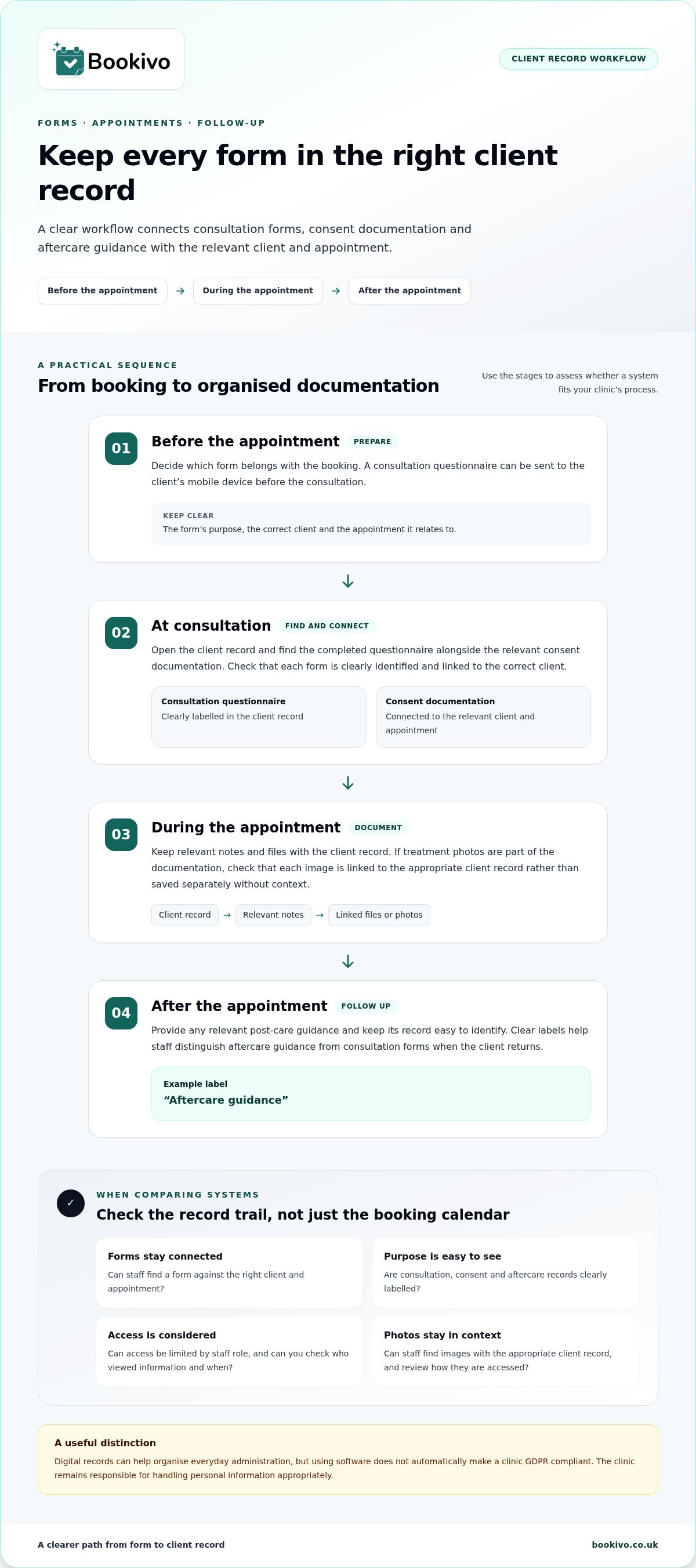
Aesthetics clinic record keeping software should connect consultations, consent and aftercare documentation with the correct client record. A clear process helps staff find relevant information alongside each appointment.
Digital consent forms and patient records
Look for software that stores each completed form against the appropriate client record. This keeps a consultation questionnaire and related consent documentation together, rather than splitting them across separate files. Staff should be able to open a client record and find the forms linked to an appointment. Check that each form’s purpose and client connection are easy to identify.
Digital forms can deliver pre-treatment questionnaires and post-care guidance to a client’s mobile device. The clinic can decide which forms relate to each booking and how completed documentation is organised. Clear labels, such as “consultation questionnaire” and “aftercare guidance”, help staff distinguish records when clients return.
Consultation form workflows
A useful workflow gives each form a defined place before, during or after an appointment. For example, a client may complete a questionnaire before a consultation, then review consent documentation as part of the clinic’s process. Relevant post-care guidance can be provided after the appointment. The system should make these stages straightforward for the team to follow.
When comparing aesthetics clinic record keeping software, map the process from booking to completed documentation. Check how staff confirm that a form belongs to the right client and appointment, and how they retrieve it later. A practical walkthrough can reveal whether the workflow is straightforward or requires extra tracking across folders and messages.
Consent audit trails
Digital consent forms should be part of a record-keeping process that supports accountability. Audit trails can show who accessed information and when, giving the clinic a record of interactions with sensitive documentation instead of relying on staff recollection. Check how the audit trail is viewed and whether it links clearly to the client record.
Access tracking matters as well as form storage. Consider which team members need to view each document and how the system records access. A clear audit trail can help the clinic review its documentation process. The clinic remains responsible for managing records appropriately, so align system use with internal procedures.
What makes aesthetic clinic software different from regular appointment booking systems?
A booking calendar manages appointments; clinic records connect them with treatment history, notes and aftercare. Before choosing, compare how each system handles access, record retention and your clinic’s workflows.
Patient record security
Patient records can include treatment histories, notes and photos, so assess how a system organises and protects them. Look for role-based access controls that restrict information according to staff responsibilities. Practitioners should be able to find relevant details without giving every team member unrestricted access. Review how storage, permissions and reporting fit your clinic’s record-handling process.
Retention also matters. UK adult medical records should generally be retained for a minimum of 8 years after the last treatment date. The CQC does not require UK aesthetic clinics to use a specific software brand. Clinics remain responsible for ensuring their setup meets their own professional, insurance and regulatory record-keeping requirements.
Records across clinic locations
For clinics with multiple locations, consider how practitioners access a client’s treatment journey when appointments take place at different sites. Check whether staff can find relevant history, notes and aftercare information across locations. Compare how records are organised and whether access can be limited according to staff roles and responsibilities.
Map a practical example: a client books at one branch, then attends another. Can the relevant team find the record and understand its context? This helps identify gaps in shared documentation and ways to streamline handovers without duplicating notes. Consider how location-level reporting works and whether teams can distinguish activity by site when reviewing clinic performance and revenue.
Plan limits can affect day-to-day use. Compare whether a plan places limits on patient records, practitioners, locations or reporting, and consider which functions the clinic needs as its team grows. GDPR is relevant to UK and EU software operations, according to the European Union. Use the Information Commissioner’s Office guidance when reviewing your clinic’s data-protection responsibilities.
A branded booking page preview can help you assess how appointments fit into your clinic’s online journey.
How does the software handle before-and-after photos while staying GDPR compliant?
Document consent, consultations, treatments and complications in the relevant client record, using dated entries and linked files. For example, keep a treatment note and its corresponding images together rather than in separate folders.
The European Union notes that GDPR is relevant to UK and EU practice management software operations. Software safeguards can support data protection, but clinics remain responsible for how they handle personal information.
Before-and-after photo management
Choose a platform that stores images with the appropriate client record and supports permission-based access, encrypted storage and audit logs. These safeguards can support the protection of sensitive records under GDPR. Check how staff find photos, who can view them and whether access is recorded. A photo saved without a clear link to a client can be difficult to interpret later.
Use a consistent documentation sequence. Record the photo’s date, its connection to the relevant consultation or treatment, and the associated consent information. Keep images separate from general marketing materials. For example, label files “consultation” and “follow-up”, then link each to the relevant record. Clear labels support accurate tracking throughout the client’s journey.
Anatomical charting and photo mapping
Anatomical charting and photo mapping can add context by linking an image to a recorded area. This helps practitioners distinguish photos from different appointments or treatment stages. Check whether the software supports these tools directly or whether staff need to add context through notes and labels. Do not assume every booking platform includes clinical charting.
For a practical comparison, follow one example through the system: open the client record, locate a photo, then identify its related consultation and treatment note. Check that the sequence remains clear when a complication is documented. Separate custom labels can help staff distinguish record types, but the clinic decides what its documentation should contain.
Where the workflow allows, keep payment records separate from clinical photo documentation. A deposit or appointment payment describes a transaction, not the image’s context or consent. Review access settings and audit logs as part of the clinic’s wider data-handling procedures. Photo storage alone does not demonstrate compliance.
Aesthetic clinic software comparisons and pricing
UK clinics can choose specialist patient-record systems or broader management software that includes online booking. Compare how each handles records, payments, reminders and your clinic’s day-to-day workflow.
UK aesthetics patient record systems
Systems designed for aesthetics clinics should connect client records with relevant consultations, treatment histories and documentation. Compare these functions with standard online booking, which may focus mainly on scheduling. For example, map how the team finds a client record, checks its history and records a follow-up.
Look for GDPR audit trails and consider who needs access to sensitive records. Check whether the platform supports your clinic’s existing process, rather than assuming every system offers the same clinical tools. A booking-led system may suit appointment administration, while a clinic-focused system may provide more record-management functions.
Software pricing comparisons
Compare subscription structures and the features included. Costs can depend on the number of bookable practitioners, locations and included functions. Check separately whether payment processing or SMS reminders carry additional charges. A plan that looks suitable at first glance may not cover every tool your team expects to use.
Before deciding, list your essentials: patient records, online booking, automated reminders, reporting and photo documentation. Compare plans against that list and identify any limits on practitioners or records. Check how a trial works, including its duration and the features it covers. This makes the comparison more useful than choosing on price alone.
Also check regional payment coverage, SMS pricing and how GDPR audit trails work, as these details can vary by region and plan. Test a typical client journey, from booking and reminders to finding the appointment record. Note any extra steps staff would need to take. A feature-by-feature comparison helps distinguish essential record tools from optional extras.
Bookivo: Beauty & Salon Booking Software
Bookivo is an online booking and business management platform for UK aesthetics clinics and beauty businesses. Its aesthetics clinic record keeping software features support appointment management, online payments and deposits, with a branded booking website where clients can book appointments. It can suit teams looking to organise bookings alongside their existing clinic processes.
Bookivo focuses on booking and business management, not medical practice management. Clinics that need specialist clinical record tools should assess those separately and consider how they work alongside appointment booking. A booking system should complement the clinic’s record-keeping approach, not replace it.
Before choosing aesthetics clinic record keeping software, map one real client journey from booking through follow-up. Note where your team needs clinical documentation and where booking tools can reduce separate administration. This simple workflow gives you a practical basis for comparing platforms, without expecting one system to cover every clinic process.
Bookivo offers an online booking system for beauty and aesthetics businesses. If your priority is organising appointments and presenting a branded booking experience, explore how it could fit alongside your clinic’s record-keeping arrangements. Keep specialist clinical documentation needs in view as you decide what your team needs from each tool.
A considered choice can help your team build a clearer, more manageable workflow. Take the next step at your own pace.
Frequently Asked Questions
Why is specialised aesthetic clinic software essential for UK practices?
Software can help clinics shape administrative workflows around their services and team structure. For example, a clinic offering several appointment types may need different booking information for each service. Before choosing, map how reception staff, practitioners and managers handle routine tasks. This shows whether a system supports your working pattern or requires the team to adapt to an unsuitable setup.
Can I migrate my existing patient records to a new practice management system?
Records can often be transferred if your current provider allows export and the new system accepts the data. Start by listing what you need to retain, such as client details, appointment history, service lists and notes. Bookivo offers a free data transfer service for exportable information. After the transfer, review sample records for missing fields or formatting differences.
Is my patient data secure with cloud-based practice management software?
Cloud storage describes how software is accessed and hosted; the term alone does not show how well information is protected. Ask how to retrieve records if you change systems and what happens to stored data when an account closes. Document who in your clinic handles these decisions. The Information Commissioner’s Office provides UK guidance on data protection responsibilities.
What about managing prescription products like Botox and dermal fillers?
Some systems let clinics record prescription-only medicine details against a patient record. Useful fields can include the product’s lot number, expiry date and dosage. This creates a traceable entry linked to the relevant record. Check whether these details can be recorded clearly and retrieved later. Software supports documentation; it does not replace practitioners’ clinical decisions or the clinic’s procedures.
What features should you look for in a modern aesthetic clinic app?
Prioritise a clear mobile experience and a quick route between the working calendar and relevant client information. Test common actions on a phone, such as finding an upcoming appointment or locating a client note. Consider whether the layout remains readable during a busy clinic day. A brief, task-based demonstration can reveal usability issues that a feature list may not show.
Will practice management software integrate with my existing website and marketing tools?
Some booking systems provide an embeddable widget, while others direct visitors to a separate branded booking page. Bookivo offers both, allowing a clinic to consider whether it wants booking within its existing website or on a dedicated page. For marketing tools, identify the specific connection you need and whether it supports your intended booking journey before building it into your workflow.