Switch from a Paper Diary to Salon Software: A Practical UK Guide
Learn how to switch from paper diary to salon software with our practical UK guide. Transfer appointments smoothly, avoid double bookings, and train staff.

What if you could switch from paper diary to salon software without changing every part of your booking routine at once? Moving appointments and client records can feel risky when a missed entry or duplicate booking could disrupt a busy day. A staged changeover gives you more control.
A paper diary is familiar, and it’s natural to wonder which details to transfer, how to keep upcoming appointments straight, and whether staff or regular clients will find a new process confusing. The answer is to plan the move around your existing bookings, rather than trying to digitise everything in one go.
This guide sets out a practical sequence for choosing what to transfer, entering and checking future appointments, and helping your team and clients adjust. You’ll also see how booking tools, team calendars and client records can reduce routine diary administration once you’re ready to rely on them. The aim is a calm transition, with a dependable way to check each booking as you move from paper to a digital workflow.
Key Takeaways
- To switch from paper diary to salon software, start by reviewing how you manage bookings and choosing a practical changeover point.
- Prepare the appointments and client details you need, then transfer upcoming bookings in date order and compare each one with the paper diary.
- Use a controlled overlap for checks, but make clear which diary is the live record to avoid conflicting updates.
- Set a regular routine for reviewing availability, recording changes and checking the team calendar as online booking becomes part of your workflow.
Why switch from a paper diary to salon software?
A paper diary feels familiar for good reason. It’s visible at a glance, easy to annotate and gives you a clear record of the day’s appointments. For a solo professional or a small team, that can work well. The decision to switch from paper diary to salon software isn’t a verdict on how you’ve run your business; it’s an operational choice about whether your current routine still suits the way clients book and your team works.
Paper can become harder to manage when booking requests arrive while you’re away from the diary, or when you need to find a client’s next appointment quickly. Changes also need to be written in the right place and shared with anyone who relies on the book. Moving to digital tools is one form of digital transformation, but the practical aim is simpler: make the information you use easier to access and update. A branded online booking website can be part of that workflow.
Which paper-diary tasks are taking the most effort?
For a few working days, note each repeated diary task: checking whether a slot is free, searching for an appointment, confirming a change or telling a colleague about an update. These are scheduling jobs. Keep related tasks separate in your notes: client records may include contact details or visit history, while reminders involve communicating appointment information. This distinction helps you identify the main source of admin before choosing what to move.
What should salon software replace first?
Start with the live appointment diary and future bookings. They affect the day’s running order, so transferring them first gives you a clear digital record to check. Keep the paper diary available for verification during the changeover, then make one system the source of truth. Client records, reminders and other processes can move across gradually, based on what your business needs and what the software supports.
Preparing to switch from paper diary to salon software
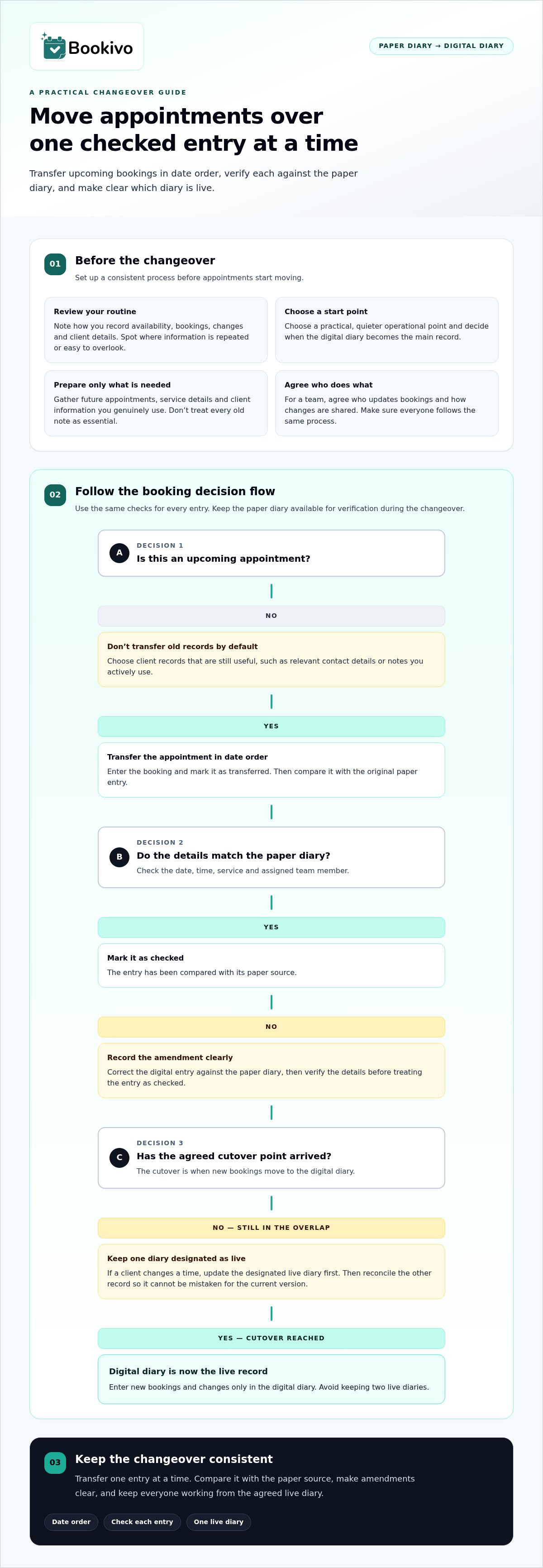
A little preparation makes the change easier to manage. Before you switch from paper diary to salon software, decide what needs to move, who will handle each task and when the digital diary becomes the main record.
- Review your routine. Note how you record appointments, availability, changes and client details. Identify where information is repeated or easy to overlook.
- Choose a start date. Pick a quieter operational point where practical, allowing time to set up and check the diary without adding pressure during a busy period.
- Prepare what you’ll enter. Gather future appointments, service details and the client information you genuinely use. Avoid treating every old note as essential.
- Brief everyone involved. Explain the change, agree who can update bookings and show staff how to communicate calendar changes.
The cutover date is the point when new bookings move to the digital diary. Choose it deliberately, and make sure everyone knows which diary is authoritative from then on.
What information should you prepare?
Start with upcoming appointments and the details needed to deliver them, such as the service booked and relevant client notes. Consider which client records are still useful, rather than transferring historical information by default. If you have questions about handling personal information, refer to the Information Commissioner’s Office guidance for organisations. The ICO provides general information; your data-handling processes remain your responsibility.
How should you prepare a solo business or salon team?
Working alone? Map how you set availability, take bookings and record changes before configuring your new routine. For a team, agree who updates appointments and how changes are shared, then make sure everyone follows the same process. If you’re still considering the setup, a branded booking website preview can help you picture how a digital booking experience might fit your business.
How to move appointments and client records without confusion
Transfer upcoming appointments in date order, working through the paper diary one entry at a time. A controlled overlap gives you a chance to compare records, but avoid keeping two live diaries for longer than needed. Decide which system staff should use for new bookings and changes, then stick to that rule.
Verify each upcoming appointment against the paper diary before treating the digital diary as the live record.
- Enter the appointment and mark it as transferred.
- Check the date, time, service and assigned team member against the original entry.
- Mark it as checked, then record any amendment clearly.
- After the agreed cutover point, enter new bookings and changes only in the digital diary.
How can you avoid duplicate or missed appointments?
Use the same transfer-and-check process for every entry, rather than relying on memory or a quick scan of the day. For a team booking, compare the assigned person’s availability as well as the appointment details. If a client changes their time during the overlap, update the designated live diary first, then reconcile the other record so it can’t be mistaken for the current version.
How should you handle client information during the move?
Transfer only information needed for your ongoing client-management process, such as relevant contact details or notes you actively use. Don’t copy old records by default. Decide how the information will be handled and who needs access; for privacy questions, consult the Information Commissioner’s Office (ICO) guidance. This practical guide isn’t legal advice.
Tell regular clients in a straightforward way, such as mentioning the new booking route when they next visit or contact you. Explain how to use it, while keeping your usual booking option clear during the changeover. A branded booking website can give clients a direct route to appointments; preview a branded booking website.
Build your new salon booking routine and choose a next step
A digital diary works best when it becomes part of the working day, not another place to check occasionally. Set a simple rhythm: review availability before appointments begin, record booking changes as they happen, and check the team calendar before confirming appointments involving colleagues. At the end of the day, scan the next day’s schedule so any unclear details can be resolved in good time.
How can a digital diary fit into the salon's working day?
For a team, shared calendars and availability management can help staff see the current schedule and understand who is available. A solo professional can use the same routine to keep their own appointments and availability up to date. Automated reminders can form part of the process, while a Customer CRM keeps relevant client information alongside appointment management. Reminders support communication, but they can’t guarantee that every client attends.
Online booking can sit alongside this routine as another way for clients to request appointments. Set availability that reflects your working pattern, then review the diary regularly so the information clients see remains current. If your salon already has a website, adding an online booking route can connect your existing web presence with the new diary without promising a particular number of bookings.
What is a low-pressure way to explore the change?
Bookivo offers a free branded preview, so you can see a mock-up of a booking website for your business before signing up. If you’d like to try the platform, its free trial lasts 7 days and doesn’t require a credit card. Use the preview to consider how online booking, team calendars and client management could fit your routine, then decide whether to take the next step.
Make the next step at your own pace
Once the new diary is in use, give yourself a planned moment to review how it fits the working day. Notice which parts of the routine feel clearer and where staff still need a prompt or a consistent way to handle changes. Small adjustments can help the system reflect how your salon actually runs, rather than forcing the team into a process that doesn’t suit them.
The decision to switch from paper diary to salon software doesn’t need to mean changing everything at once. Start with the booking workflow you want to improve, then explore whether a digital setup feels right for your business.
A calm, considered change can give you a more manageable routine while keeping the decisions in your hands. Take the next step when you’re ready.
Frequently Asked Questions
How long does it take to switch a salon from a paper diary to software?
There’s no fixed timetable. The time to switch from paper diary to salon software depends on how many future appointments you need to enter, how much client information you plan to carry across and whether staff need time to learn the new routine. Keep the first stage manageable: begin with the active schedule, then address older records only if they’re useful for ongoing work.
Should I keep using my paper diary while setting up salon software?
Yes, you can keep the paper diary available as a reference while preparing the digital one. Avoid recording the same new booking in both without a clear process, as that can leave staff unsure which entry is current. If an appointment changes during setup, make a note of the change and confirm it has been reflected in the system you’ll use going forward.
Can I transfer all my salon clients' details into booking software?
Transfer only client details that support your ongoing service, using a process available in the software you choose. Moving every old record isn’t automatically necessary. Decide which information is useful, such as a client’s name and contact details, and avoid adding details simply because they appear in an old file. For questions about handling personal information, consult the Information Commissioner’s Office guidance for organisations.
How do I stop clients getting confused when I move to online booking?
Make the new route easy to understand. Explain where clients can book, what details to provide and how they can reach you if they’re unsure. Share the same instructions across the places clients already use to find your business, such as your website or social media profile. Keep the message calm and practical; some regulars may need a little time to adjust.
Is salon booking software suitable for a solo beauty professional?
Yes. A solo professional can use booking software to manage their own appointments and availability without coordinating a team. Consider whether a branded booking website and client-management tools suit the way you work, then build a routine around checking your diary between appointments. Bookivo offers booking software for solo beauty professionals.