Getting my salon business organised for smoother daily operations
Getting my salon business organised starts with routines. Learn to manage bookings, payments, stock and daily tasks, and choose tools that suit your salon.

A smoother salon day starts with clear routines, not a longer to-do list. Getting my salon business organised means giving bookings, payments and daily tasks a reliable place, so fewer details depend on memory. Start with the parts of the day that feel most fragmented, then simplify them one at a time.
Appointment messages, client notes and routine jobs can all compete for your attention, especially when you’re looking after clients. A few practical systems can make the working day easier to manage without adding unnecessary steps.
This guide explains how to organise everyday salon operations, make booking simpler and keep track of regular tasks. You’ll also learn what to consider when choosing online booking and point-of-sale software, so you can decide which tools suit the way your salon works.
Key Takeaways
- Map the tasks that interrupt your salon day, then create simple routines for handling them consistently.
- Make booking straightforward by presenting clear services, appointment information and an easy way to request a slot.
- Keep appointment, payment, stock and business records organised so you can review what needs attention.
- Choose booking and point-of-sale tools around the way your salon works, and the tasks you want to manage more smoothly.
1. How can I make running and operating my salon easier?
Getting my salon business organised starts with understanding the business’s costs. Separate one-off setup purchases from regular expenses, then list rent, rates, bills, products, software, staff, cleaning and accountancy. This gives you a clearer view of the income the salon needs to cover its commitments.
When planning startup funding, match the amount sought to specific costs, such as equipment, furnishings or initial stock. Compare funding terms with expected cash flow and repayment responsibilities. Build a forecast that allows for quieter trading periods, delayed opening plans or unexpected repairs, rather than relying on one optimistic income estimate.
A useful business plan sets out your services, intended clients, premises, staffing and financial forecasts. Dedicated platforms such as planova.me can help model cash flow and build forecasts, making it easier to explain how you expect to attract bookings and cover operating costs. Review the plan when your services, staffing or expenses change, so it remains a practical decision-making tool rather than a document filed away after launch.
To assess profitability, record income and costs consistently. Compare each service’s price with the time, products and staff costs involved, then include overheads such as rent and bills. Review the figures before changing your service menu or prices, and note which services contribute most towards covering the salon’s costs.
Salons also need clear routines for hygiene, workplace safety and handling personal information. Assign responsibility for cleaning and record-keeping, and use official UK guidance to understand relevant health, safety and data protection responsibilities.
According to the UK Government, a salon must register for VAT if its taxable turnover exceeds £90,000 in the last 12 months or is expected to exceed £90,000 in the next 30 days. Include turnover monitoring in your financial routine and keep income records current, so you can identify when registration applies.
2. Making it easy for clients to book
A clear booking journey starts with a service menu clients can understand. Group treatments by type, use familiar names and explain what each appointment includes. For example, distinguish a root touch-up from a full-head colour service, then show the relevant stylist or appointment option. Clear details help clients choose without sending repeated messages.
Keep each booking step focused. Show the service, appointment length, price, available times and any deposit or cancellation information before the client confirms. Use consistent wording across your booking page and marketing, so a service promoted on social media matches the option clients see when booking.
Identify your target clients before deciding what to highlight. A salon specialising in nail art may attract different clients from a barber offering classic cuts. Consider what regulars value, such as evening appointments, a particular stylist or a quiet consultation. Use those needs to shape service descriptions and the information shown first.
Make the client experience easy to follow on a mobile screen as well as a computer. Keep forms concise, avoid asking for the same details twice and provide a clear confirmation after a booking. When clients can find the right service and understand the next step, they have less reason to abandon the process or contact the salon for basic information.
Review the booking journey by testing it as a new client. Try to book a colour appointment, change the service and locate the salon’s contact details. Note any confusing labels, missing information or unnecessary steps, then make one improvement at a time. This also helps ensure your booking process reflects the salon’s passion and professional standards.
A branded booking page can bring service details and appointment choices together in one place, giving clients a direct route to book.
3. Managing appointments, payments, inventory and reporting
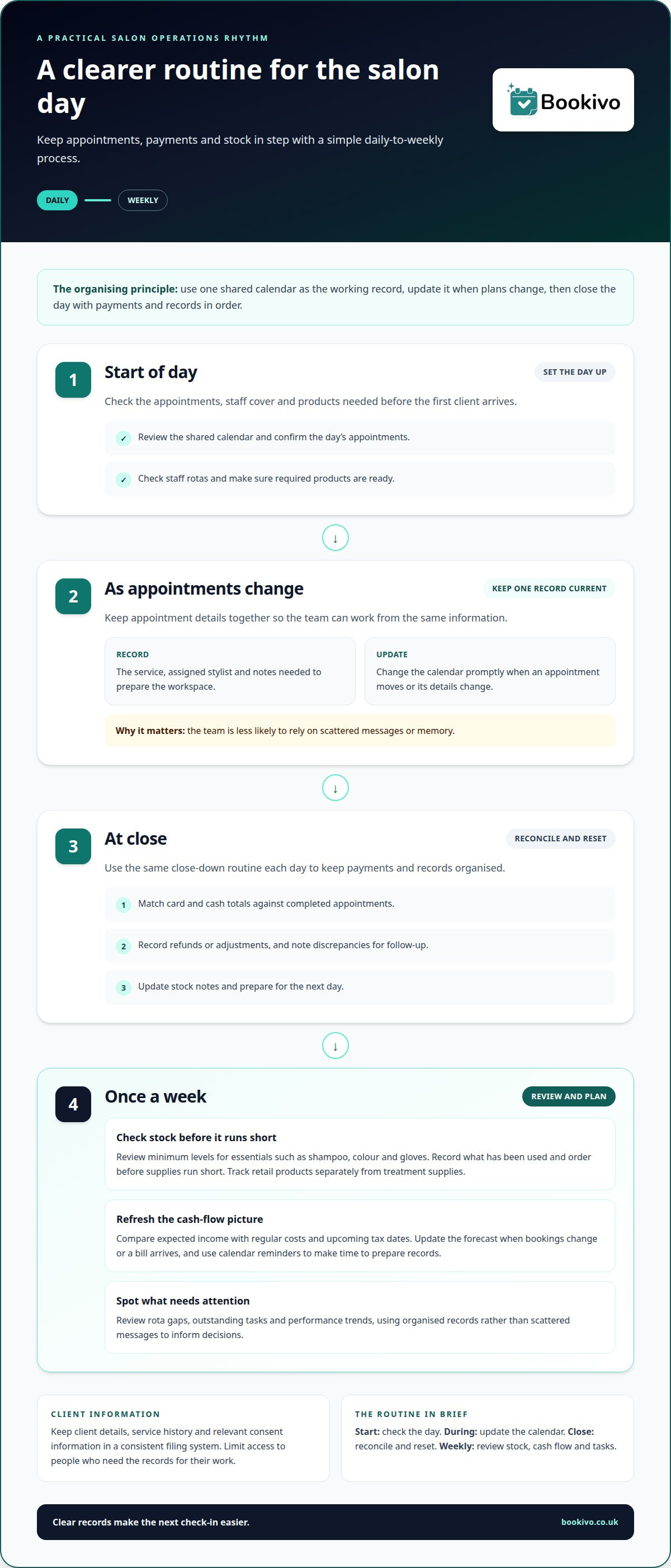
Use one shared calendar as the working record for appointments and staff rotas. Add the service, assigned stylist and any notes needed to prepare the workspace. When an appointment changes, update the calendar promptly so the team isn’t relying on messages or memory.
Set a repeatable daily close-down routine for payments and records. Match card and cash totals against completed appointments, record refunds or adjustments, and note any discrepancies for follow-up. Keep business records organised so you can refer to them when preparing for tax time.
For cash flow, record expected income alongside regular costs and upcoming tax dates. Review the figures on a set day each week, then update the forecast when bookings change or a bill arrives. Calendar reminders for tax deadlines give you time to prepare records rather than rushing at the last moment.
Inventory needs a simple process too. Set a minimum stock level for essentials such as shampoo, colour and gloves. Check those items during a weekly stock review, record what has been used and order before supplies run short. Track retail products separately from treatment supplies to make sales and usage easier to understand.
Salon records include client details, service history and relevant consent information. Limit access to people who need those records for their work, and use a consistent filing system. A digital client management system can keep client information with appointment details instead of scattering notes across paper files and messages.
Requirements for registrations, premises and insurance can depend on the services offered and how the salon operates. GOV.UK and your local council provide information on relevant registrations, while an insurer can explain cover options for your business and employees.
To organise daily operations, start by checking the day’s appointments, staff cover and required products. At closing, reconcile payments, update stock notes and prepare for the next day. A short weekly review can cover rota gaps, outstanding tasks and performance trends, helping owners make decisions using records rather than scattered messages.
4. Selecting point-of-sale and booking software
Start by separating the jobs you need software to handle. Booking tools organise services, staff availability and appointments. Point-of-sale systems record in-person payments and retail sales. Some salons use separate tools, while others prefer a booking platform that also supports online payments. Decide which tasks matter most before comparing options.
Test the booking journey using real examples from your salon. Add a hair appointment, assign a stylist and check how the service appears to clients. Make sure treatment names, durations and prices are easy to understand. Then try changing an appointment and handling a cancellation, so the team can see how everyday changes are managed.
For payment handling, consider how the system records transactions and helps reconcile them with completed appointments. If you sell retail products, check whether sales can be recorded in a way that supports your existing stock process. Don’t assume booking software replaces accounting tools or a physical card terminal. List each requirement separately and compare it with the system’s stated functions.
Ask staff to test the workflow during a quiet period. A solo stylist may prioritise simple appointment management, while a salon with employees may need a shared view of team schedules. Check how client records are stored and accessed, and make sure your processes for personal information are appropriate. Ease of use matters: a complicated system can add steps instead of reducing them.
Compare ongoing costs, payment terms, support and the work involved in moving existing information. Look for clear explanations of transaction charges, contract periods and cancellation conditions. A short trial using your own services and daily routines can reveal practical issues before you commit. Choose software that supports your actual workflow, not a long list of features you won’t use.
Bookivo
Bookivo helps salons organise online bookings through a salon booking platform with a branded booking website. Clients can manage appointments, pay deposits and make online payments. Automated reminders support communication about upcoming bookings.
If appointments are spread across messages and paper diaries, a more joined-up booking process may help. Explore the available software plans to see whether they suit your salon’s needs.
Build a salon routine that can grow with you
Getting my salon business organised is an ongoing process, not a one-off clear-out. Choose one recurring source of friction and make a manageable change to how it’s handled. Give the new routine time to become familiar, then decide whether it has made the working day clearer for you and your team.
As your services, staffing or client expectations change, revisit the systems supporting your business. Keep what works, adjust what creates unnecessary steps and make sure everyone understands the agreed process. Small, deliberate improvements can help your salon stay organised without adding complexity.
If a more joined-up booking setup is the next step, explore how Bookivo could fit your business.
See what Bookivo could look like for your business.
Take the next step at a pace that suits your salon. A clear routine gives you a stronger base for what comes next.
Frequently Asked Questions
How can I make running and operating my salon easier?
Make recurring decisions easier by writing down how routine situations are handled. For example, create a short opening checklist for preparing treatment areas and a closing checklist for securing products and resetting workstations. Keep the instructions where the team needs them, such as beside the stock cupboard. This reduces repeated questions and helps employees follow the same process during busy periods.
What makes a salon profitable?
A salon is profitable when its income exceeds the costs of delivering services and running the business. Review each service’s time, product use and staff costs alongside rent, bills and other overheads. Then compare those costs with the price charged and the number of appointments completed. A service that fills the diary may still contribute little profit if its costs or delivery time are too high.
What’s the best salon software?
The right software fits your salon’s actual workflow. Check whether it covers the tasks you need, such as online bookings, team calendars, client records or payment collection. Bookivo offers beauty and salon booking software, including a branded booking website for appointments and online payments. Consider how easily staff can use the system before choosing it for daily operations.
What salon booking and management software is best for a small salon in the UK?
For a small UK salon, look for booking software that lets clients book online and gives you a clear view of appointments. Bookivo offers an online appointment booking system and branded booking website, which may suit a solo professional or a small team. Compare the tools with your daily needs, including who manages bookings and how clients receive appointment information.
How do I manage salon stock, suppliers and product costs?
Use a stock sheet or inventory tool to record product names, quantities received and quantities used. Separate back-bar products from retail items, then compare expected stock with a physical count during regular checks. Keep supplier invoices together and note delivery dates or substitutions. When a product is used faster than expected, investigate service usage or wastage before placing the next order.
What health and safety, hygiene and data protection rules apply to UK salons?
Salons need clear routines for hygiene, workplace safety and handling personal information, with responsibility for cleaning and record-keeping assigned. Use official UK guidance to understand relevant requirements, limit access to client records to people who need them for work, and keep records in a consistent filing system.