Online Booking Automation for Hair Salons
Learn how to automate salon bookings with online scheduling, a shared calendar and client self-service. See how to connect booking channels and manage changes.
A booking system should do more than add appointments to a calendar. The practical answer to how to automate salon bookings is to let clients book online at any time, bring those appointments into one schedule and make it easy for clients to manage changes themselves.
This means fewer booking tasks interrupt your day, while clients can choose an appointment without waiting for a reply. A shared calendar also gives you a clearer view of availability and helps prevent clashes when bookings change.
This guide covers what to look for in online booking, how to connect booking channels to your schedule and which self-service options help clients manage appointments. It also explains how to get started and where booking software can support your salon’s workflow.
Key Takeaways
- Offer online booking at any time so clients can choose an available appointment without calling the salon.
- Bring booking links from your website and social channels into a clear scheduling process to make availability easier to manage.
- Set up service and staff availability carefully so clients can choose appointments that fit the salon’s schedule.
- Give clients options to manage repeat appointments and book several services together, and use automated reminders to support appointment management.
24/7 Online appointment booking
Online booking lets clients request an appointment outside opening hours. To automate salon bookings, start with accurate service availability and a calendar that reflects staff schedules.
Live appointment scheduling
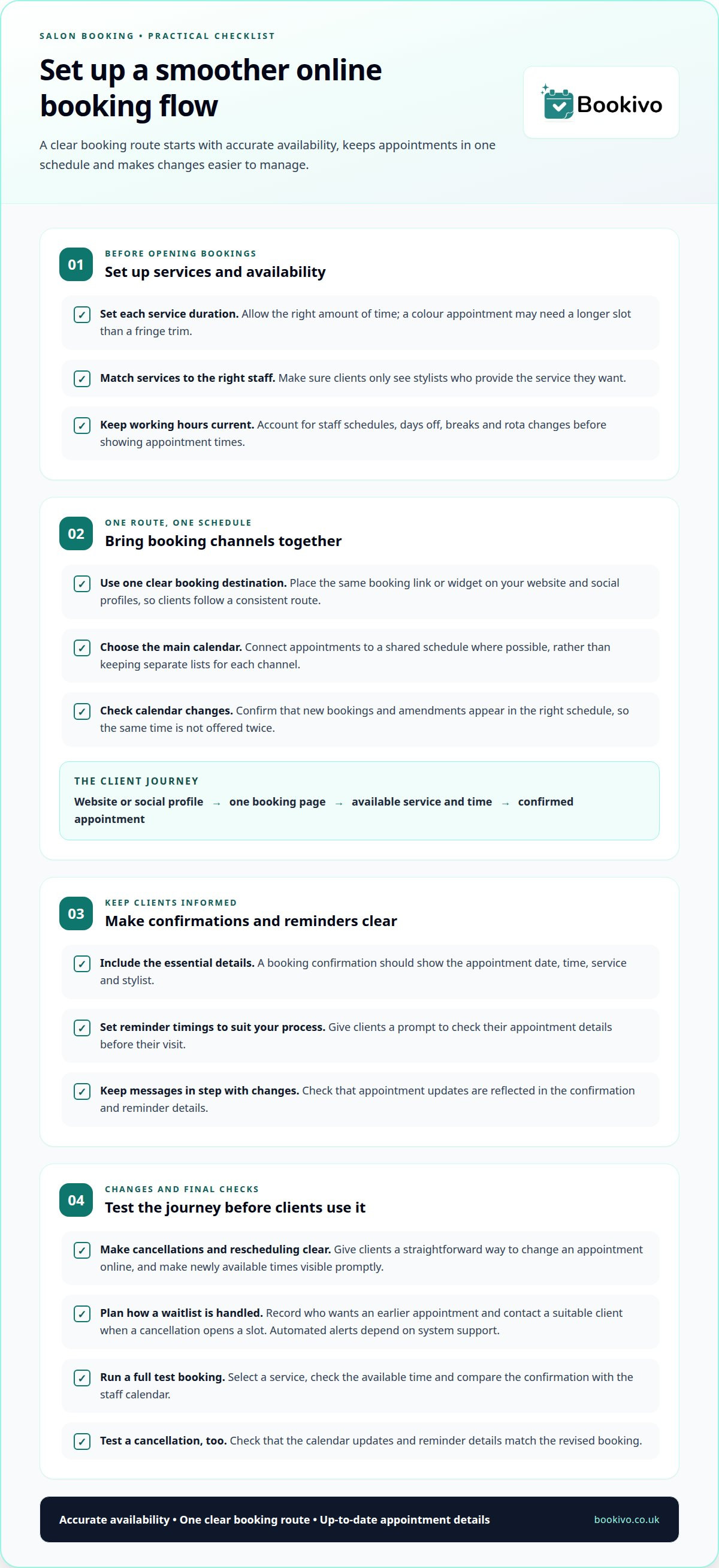
Set each service’s duration, staff availability and working hours before opening appointments online. A colour appointment, for example, may need a longer slot than a fringe trim. The calendar should update when clients book or change appointments, so the same time is not offered twice. Review availability whenever staff hours or treatments change.
Booking confirmations and reminders
Send a confirmation after each booking with the appointment date, time, service and stylist. A reminder before the visit gives clients a prompt to check these details. Choose message timings that suit your salon’s process, and make sure updates reflect any booking changes. Clear, current information helps clients stay on top of their appointments.
Cancellations and waitlists
Give clients a clear way to cancel or reschedule online, and make newly available slots visible promptly. To manage a waitlist, record who wants an earlier appointment and contact a suitable client when a cancellation opens up. If your booking system supports it, automated messages can alert clients to an available slot. Explain how to accept it.
Incorrect service durations, staff hours or treatment availability can expose unsuitable appointment times. Before opening online booking, test the full journey from service selection to confirmation. Then cancel a test appointment and check that the calendar updates. Review the reminder details against the revised booking, too. These checks help catch setup errors before clients rely on your booking page.
Online booking across websites, apps and social media
Give clients one clear booking route from your salon website, Instagram profile or Facebook page. A booking link or widget can accept appointments at any time, including when the salon is closed. To automate bookings across digital channels, use the same destination wherever clients find your business. You can then update one booking page instead of maintaining separate appointment details on each profile.
Connect online appointments to a shared calendar instead of keeping separate lists for each channel. Some booking software connects with calendars such as Google Calendar or Outlook, so staff can view appointments alongside other commitments. Decide which calendar is your main reference, then test a booking from your website and social profile. Check that it appears in the right schedule and that changes show up there.
Booking systems handle client details, so include data management in your setup. UK GDPR applies to personal data; the Information Commissioner’s Office (ICO) provides general guidance on handling it. Limit staff access to booking details according to their roles, and collect only information relevant to managing appointments. Keeping records in one place also avoids treating social channels as separate client records.
Online deposits and payments can be part of the booking journey. For example, a salon may request a deposit when a client selects a service, with the payment step clearly shown before confirmation. Check how the system records payments against appointments, and explain deposit terms clearly. Make sure payment feels like a natural part of the route from a social post or website to a confirmed appointment. Client feedback can highlight any confusing steps.
A branded booking page gives clients a direct route to view and book appointments.
How do I start using online scheduling for my hair salon?
Start with staff profiles, working hours and the services each stylist provides. Then check that online booking reflects the salon’s actual rota.
Staff availability and profiles
Create a profile for each stylist, listing their working hours and specialisms. For example, clients looking for a particular colour service should only see stylists who provide it. Set availability around days off, breaks and rota changes. Clear profiles help clients choose a suitable appointment, while accurate schedules reduce the risk of double bookings.
Before opening bookings, test a service from the client’s perspective. Select a stylist, review the available times, then compare the confirmation with the staff calendar. Repeat the test after changing working hours. This can reveal mismatches between a stylist’s profile and the appointments clients can select.
Scheduling for different salon setups
A freelancer can focus on one profile, their services and available hours. A small salon needs a shared view of staff schedules, so clients can match services with suitable stylists. If your business has several locations, check whether each site’s staff and availability are clearly distinguished. The right fit depends on how many people manage appointments and how you organise your rotas.
For each location, map the staff rota, service list and appointment calendar before enabling bookings. Keep each stylist’s hours current, especially when shifts or locations change. If campaigns or social posts direct clients to book, make sure the booking route shows the right staff and site. Confirmations should be easy to match to the relevant appointment and team member.
Use a mobile app or browser to review the schedule during the working day, and update availability when changes arise. A solo professional may need a simple personal calendar; a team may need staff-level scheduling across its rota. Start with your salon’s actual structure, then check that clients can select the right service, stylist and location without confusion.
Customer self-service booking and account management
Let clients choose a service, check availability and book without messaging reception. Self-service can also support repeat appointments and bookings for several services in one visit. For example, a client could book a cut and finish together, then arrange another appointment later. Make service names and durations clear so clients understand what they are booking.
Clients may need to reschedule or cancel when plans change. Give them a straightforward way to manage an existing appointment, and make sure the updated booking appears in the salon’s schedule. Staff can then see which stylists are available without manually transferring every change. Make it clear when a cancellation or rescheduling request is complete.
Consultation forms and client records have a different role from appointment selection. A salon can use digital forms to collect relevant information before a visit and maintain client details for future appointments. This is especially vital in treatment-focused environments; for instance, specialised skin clinics like Cosmetic Wellness rely on thorough pre-visit consultations to coordinate non-surgical aesthetic procedures safely. Give staff access appropriate to their responsibilities, and avoid collecting information that is not needed for the service. Check separately whether your booking system offers these features or whether you need another tool.
Mobile access matters for clients booking appointments and staff managing the day’s schedule. Check that service choices, availability and rescheduling are easy to use on a phone. Inventory and retail stock are separate operational needs, so decide how you will manage them alongside appointment bookings. This helps avoid assuming that booking software also covers stock.
Bookivo: Automated Appointment Reminders
Bookivo brings online booking and automated appointment reminders together, helping salons manage appointments without handling every booking message manually. Its branded booking website lets clients book at any time, and reminders keep appointment details in front of them before a visit.
Consider Bookivo’s beauty and salon booking software if you want online bookings and reminders in one platform designed for beauty businesses. Keep service details and availability up to date so clients see relevant appointment options.
Contact Bookivo to discuss your salon’s booking needs.
Shape a booking process that fits your salon
To decide how to automate salon bookings, start with the part of your working day that still relies on repeated manual tasks. Review one process first, such as how bookings reach the calendar or how clients receive appointment updates. This focused approach helps you judge whether a new setup fits your salon’s routines.
Bookivo offers Beauty & Salon Booking Software, Aesthetics Clinic Booking Software and an Online Appointment Booking System. Consider how online booking and reminders could fit your workflow, then decide which tasks you want to bring together. If deposits or consultation forms are important to your process, check with Bookivo whether these are supported before planning around them. The aim is a manageable setup for staff and a straightforward booking journey for clients.
Explore how a branded booking experience could work for your salon and its services. Decide what clients can manage independently and which appointment details your team needs to oversee.
Starting with one clear process can help you build a booking routine that suits your salon.
Frequently Asked Questions
What Features Should the Best Salon Booking Software Have?
Choose features that match your salon’s day-to-day workflow, rather than focusing on the longest feature list. Useful essentials include service and staff scheduling, online booking, appointment reminders and a clear way to manage changes. If clients complete consultation forms or pay deposits before visits, check whether those steps fit into the same booking journey. Also consider how easily staff can keep services and availability up to date.
Can salon software work on mobile?
Salon booking software can be used on mobile, but the experience depends on the system. Test the client booking journey on a phone, from selecting a service to confirming an appointment. Consider what staff need to do away from a desk, such as viewing appointments or updating availability. A mobile-friendly booking website can work in a browser, without requiring clients to install an app.
Is a Salon Booking App Worth the Investment?
It can be worthwhile if manual booking tasks regularly interrupt appointments or make it difficult to keep the diary current. Consider how often staff answer booking enquiries, update schedules or send appointment details by hand. Then assess whether online self-service would simplify those tasks. The value depends on your workflow, team and the features you will use.
Which salon booking systems integrate with websites, Google, Instagram and Facebook?
Some booking systems provide a website widget or booking link to share on social profiles. Calendar connections, including Google Calendar, can make appointments visible alongside other work commitments. Check what each connection does: does it show availability, add confirmed bookings, or both? Test the booking route from each channel to make sure clients reach the right services and schedule.
How can salons automate appointment reminders and reduce no-shows?
Use automated reminders to send appointment details before a client’s visit, including the date, time and service. Keep contact details current and cancellation or rescheduling instructions easy to follow. These steps help clients act if plans change, but reminders cannot guarantee attendance. Review the reminder process whenever appointment details or salon procedures change.
How to automate deposits, payments, cancellations and refunds for salon appointments?
Set up deposits or payments during booking, make the payment step and deposit terms clear, and check that payments are recorded against appointments. Let clients cancel or reschedule online, then ensure the calendar updates and any newly available slot is visible promptly.