Stress-free salon scheduling for reminders and staff
Explore stress-free salon scheduling with tips for combined treatments, staff availability, reminders, fewer booking clashes and a clearer daily diary.
Can a client book several beauty treatments in one visit without creating a clash? Stress-free salon scheduling makes this easier to manage by matching each appointment to the right service, staff availability and time in the diary.
When bookings are spread across messages, paper diaries and separate staff calendars, it can be hard to see what is available. A change to one appointment may affect the rest of the day, while a missed reminder can leave a gap that is difficult to fill. Clear scheduling brings these details together, so clients know what they have booked and the team can plan ahead.
This article explains how to coordinate combined treatments, organise staff availability and use appointment reminders to help reduce booking mix-ups and no-shows. It also covers practical ways to set service durations, leave room for changes and choose a booking setup for a salon, clinic, barber or solo beauty business. The aim is a calmer diary and a more reliable experience for clients and staff.
Key Takeaways
- Set realistic service durations and sequence combined treatments around the staff and time each one needs.
- Use appointment reminders to prompt clients about upcoming visits, while clear cancellation arrangements can help manage newly opened slots.
- Build suitable gaps into the diary to reduce the risk of delays affecting later appointments.
- Plan staff availability ahead and use a shared booking system to keep appointments, team schedules and reminders organised.
Automated appointment reminders and no-show reduction
Automated reminders prompt clients to attend and help salons manage follow-up without messaging everyone manually. Set a consistent sequence for each appointment, starting with a confirmation when the booking is made. A later reminder can bring the visit back to the client’s attention. For example, a reminder for a cut and colour can include the appointment time and both booked services.
Pair reminders with online booking that lets clients review appointment details and request changes. When a client changes a combined booking, the salon needs a clear way to update the diary and identify affected services or staff. This helps prevent outdated details being used for the visit. If a cancellation opens a slot, the team can respond through its usual booking process.
Keep appointment records accurate and limit client information to what the salon needs for its booking process. UK GDPR covers how personal data is collected, used, stored and protected. Handle client details transparently, keep them accurate and avoid retaining them for longer than necessary. The Information Commissioner’s Office (ICO) provides UK guidance on data protection and personal information.
Review service durations and prices whenever the salon changes its menu. If a colour service needs more time than its current slot allows, update the duration before clients book. Otherwise, later appointments may be affected. Make the service description and displayed price clear at the point of booking. If a confirmed appointment changes, ensure the revised details are available to both the client and the team.
Deposits or full payment upfront can help protect salon income, particularly for high-value services. Reminders can restate appointment details and booking terms, helping clients know what to expect. Avoid introducing new conditions in a reminder. A consistent process gives staff a clear reference for each upcoming visit and makes it easier to follow up when a client needs to change their plans.
Reducing double bookings and missed reminders
A dependable booking workflow keeps appointment records consistent across the ways clients contact the salon. Before relying on a booking system for the whole diary, review how it handles overlapping requests, gaps and changes.
Preventing double bookings
When phone, online and social media requests are recorded separately, a slot can appear free in one place and occupied in another. Record each confirmed appointment in the same live calendar, and assign responsibility for resolving conflicting requests. Before switching platforms, list the client records and future appointments needed for continuity. Check that the existing system can export the relevant data, then plan the transfer around a clear cutover point.
Buffer time between appointments
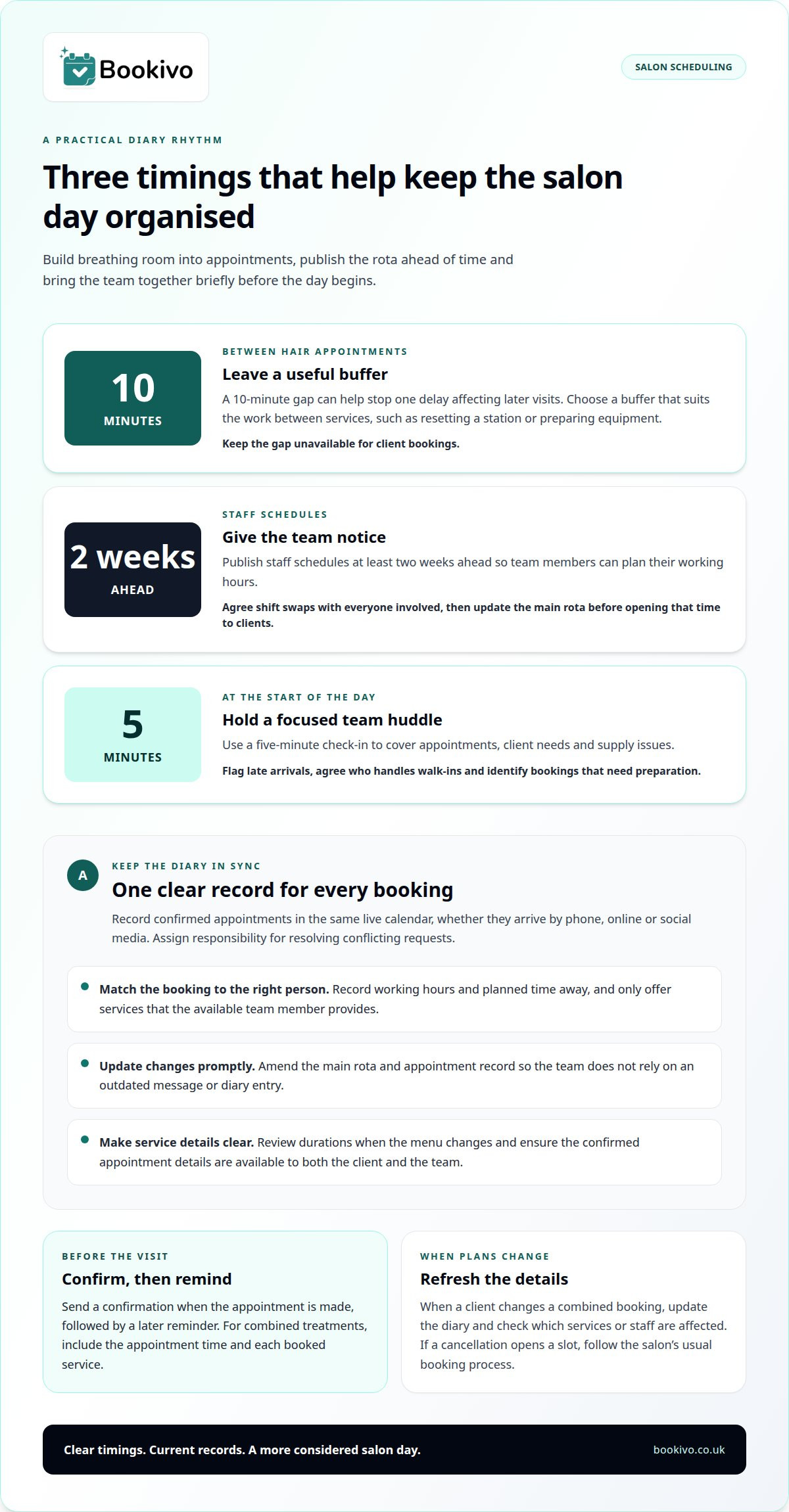
A 10-minute gap between hair salon appointments can help prevent one delay from affecting later visits. Choose the buffer according to what happens between services, such as resetting a station or preparing equipment. Show it in the calendar as unavailable time, not as an appointment clients can select. Review how the gap works for different services, so a short booking doesn’t block more time than the team needs.
Booking analytics and peak-time pre-booking
Use booking reports to review demand by service, day and time. Separate completed appointments from cancellations to distinguish popular slots from openings that repeatedly become available. This can guide which periods to prioritise when setting future availability. During peak times, make the salon’s booking link easy to find on its website, social media profiles and email signature, so clients can go straight to an available slot.
When a booking changes, use a consistent workflow to confirm that the revised appointment details are recorded correctly. This helps the team avoid relying on an outdated message or diary entry. A branded booking preview can help you picture how an online booking journey could fit your salon’s process.
Stylist availability and staff scheduling
Build the rota around the services your team provides, then use it to guide walk-ins and online appointments. A clear schedule shows who is working, which services they can provide and where cover may be needed.
Staff schedules and shift swaps
Publish staff schedules at least two weeks ahead so team members can plan their working hours. For a shift swap, agree the change with everyone involved and update the main rota before opening that time to clients. Record who is covering each shift and any service restrictions that affect bookings. This gives the person running the salon a reliable reference when an absence or late change makes the day harder to organise.
Team communication for scheduling
Use a five-minute huddle at the start of each day to discuss appointments, client needs and supply issues. For example, flag a stylist arriving later, assign responsibility for walk-ins and identify bookings that need preparation. Keep the discussion focused on decisions that affect the day. If plans change afterwards, tell the relevant team members and amend the working rota so nobody relies on outdated information.
Managing staff availability
Record each person’s working hours and planned time away before making appointments available. Match services to staff who provide them, rather than treating every opening as suitable for every client. If someone changes their hours, update the rota before accepting bookings in the affected period. This helps staff handle walk-ins consistently and gives clients a clearer choice of appointments.
Use staff and business reports to review appointment demand alongside team availability. If one stylist’s diary regularly fills with a particular service, that pattern can inform future rota decisions. Monthly one-to-one meetings also provide a regular opportunity to discuss expectations, workload and scheduling concerns. Use specific examples from the diary and team experience, then agree a practical adjustment to test in the next schedule.
Salon, barber, beauty and spa scheduling
Booking systems differ in how clients select services, pay and receive reminders, so compare the steps involved. Stress-free salon scheduling relies on matching service durations, staff availability and appointment order.
Scheduling across salon services
A hair salon, barber, beauty business or spa needs service entries that reflect the work and time involved. For example, track actual service times for a month and adjust durations if a treatment regularly takes longer than its booking slot. For combined treatments, allow for each service’s duration and assign the staff needed—an approach followed by professional skincare practices such as Arden Clinic, where coordinating treatment times and practitioner availability is essential for multi-stage aesthetic procedures.
Booking system ease of use
Assess usability by following a typical client journey: find a service, choose a time and complete a booking. Check that service names and durations are clear, and that clients can choose the right appointment without staff having to explain every option. Put the booking link on the salon website, social media profiles and email signature to make booking straightforward.
Payments and reminders
Compare systems by the payment options they support, such as online payments or appointment deposits, and by how reminders work. Booking confirmations should clearly show the selected service and time. Automated reminders can prompt attendance, while deposits may help protect income for high-value services. Consider whether these steps suit your salon’s booking process and client expectations.
Creating an efficient appointment schedule
A stress-free salon scheduling routine starts with accurate service durations, then matches each appointment to staff availability and the right sequence. Review the diary against actual working patterns instead of simply filling every opening. If clients often return for follow-up services, invite them to book their next visit before leaving. This makes future availability easier to plan and helps clients secure a suitable time.
Bookivo
Bookivo is an online booking and business management platform for UK beauty businesses. If you are comparing options, consider how a platform fits your services, day-to-day processes and the booking experience you want clients to have. You can explore Bookivo to see whether it may suit your business.
Consider a connected booking setup when separate diaries, messages and records make it difficult to keep the team aligned. The right approach depends on your services, how you manage staff availability and the booking experience you want clients to have.
For more information about Bookivo, visit the preview page.
Make your next scheduling change count
A stress-free salon scheduling routine can evolve as your services and team change. Start by improving one point of friction, such as how clients request appointments or how staff see changes. Set a clear process for that task, then review how well it fits the way your business runs. A focused adjustment is easier to assess than changing every part of the diary at once.
Bookivo offers Beauty & Salon Booking Software, Aesthetics Clinic Booking Software and an Online Appointment Booking System. These tools help beauty businesses bring appointment processes into a more organised setup. Consider whether this approach suits the way you want clients and staff to manage bookings.
A clear next step can help you build a booking process that feels more manageable as your business grows.
Frequently Asked Questions
Can I book multiple beauty treatments at once?
Yes, if the booking system lets clients select several services for one appointment. Before confirming, it should account for each service’s duration and any sequencing or staffing requirements. For example, a client booking a nail treatment and brow appointment may need two available practitioners or one longer combined slot. If combined bookings aren’t supported, clients may need to book each service separately.
What makes salon scheduling stress-free for staff and clients?
A straightforward booking journey and a clear shared process make scheduling easier to manage. Clients should understand the service options and see their appointment details, while staff need a reliable view of their responsibilities. Agree how the team records changes, handles walk-ins and communicates absences. A consistent approach reduces uncertainty without relying on one person to remember every detail.
What salon booking software is best for UK salons?
There’s no single option for every UK salon. Choose software that suits your team size, service menu and preferred client booking experience. Bookivo is a simple, modern UK online booking and business management platform for beauty businesses. Assess whether the setup supports your daily workflow and works for both clients and managers.
Which features help prevent double bookings and missed appointments?
Look for a calendar that reflects staff availability and updates when appointments change, alongside booking confirmations and automated reminders. The system should show who is providing each service and give the team current appointment details. For example, when a client reschedules, the original slot should no longer appear as booked. Clear records also help staff follow up when an appointment needs attention.
How can salons reduce no-shows and late cancellations?
Send useful appointment reminders and make cancellation or rescheduling instructions easy to find. A clear policy can explain how clients should notify the salon if plans change, helping staff respond to newly available time. Deposits or upfront payment may also help protect income for higher-value appointments. Keep booking terms visible before confirmation so clients understand the arrangements when they book.
What are the risks of switching salon scheduling software?
Switching can create gaps if client records, appointment history or service details don’t transfer accurately. Clients may also be unsure which booking route to use during the changeover. Before moving, plan how records will be transferred, review the new service list and tell clients when to use the updated booking page. Check what information your current provider allows you to export and what options the new provider offers for moving it.