Low cost salon software UK: compare booking options
Compare low cost salon software UK options by booking fees, subscriptions, calendars and client tools. Choose an option that suits your business and budget.

A low monthly fee isn’t the only measure of affordable salon software. The right option should make appointments easy to manage, keep calendars clear and explain how booking and payment charges work. Choosing low-cost salon software in the UK means looking beyond the headline price: some providers charge a fee or percentage for each booking instead of a monthly subscription.
For a salon, clinic, barber or solo professional, a clear view of availability helps keep the diary organised as appointments are booked or changed. Compare booking and payment arrangements, calendar tools and client-management features, then weigh the cost against the way you work. This helps you choose software that supports your business without paying for unnecessary complexity.
Key Takeaways
- Compare subscription and per-booking charges to understand how software costs may change as bookings grow.
- Use a trial or demonstration to assess the booking flow, calendar and support before switching.
- Match the software to your business type, team and payment needs, and consider how client data is managed.
- Prioritise clear calendars, straightforward rescheduling and appointment reminders to make diary management easier.
What makes salon software suitable for UK salons?
Finding low-cost salon software in the UK means comparing the subscription with the tools your diary needs. Review the trial, ongoing charges and cancellation terms before moving your bookings.
Free Trials and Assessing Software Before Switching
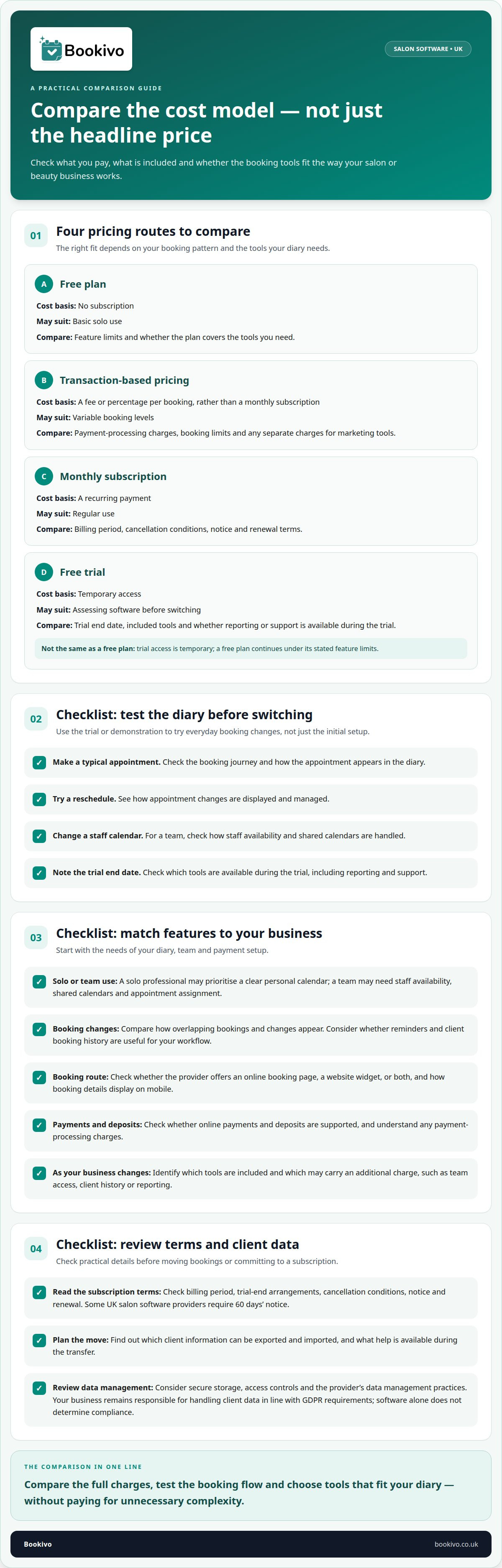
A free trial lets a salon test the booking journey before moving its diary. Try a typical appointment, a reschedule and a staff-calendar change. Then assess whether reporting and support are available during the trial, and note its end date. Unlike a free plan, trial access is temporary; a free plan continues under its stated feature limits.
Free Plans and Transaction-Based Pricing
Some UK providers offer free plans or trials, but availability and included tools vary. A free plan may suit a solo professional needing basic booking. Transaction-based pricing instead charges a fee or percentage per booking, rather than a monthly subscription. Compare payment processing, booking limits and whether marketing tools carry separate charges. This makes the total easier to judge against actual use.
Subscription Flexibility and Cancellation Terms
A monthly subscription creates a recurring charge to compare with per-booking fees. Check the billing period, trial-end arrangements and cancellation conditions. Some UK salon software providers require 60 days’ notice. Review notice and renewal terms before signing up, so the subscription fits your plans as well as your budget.
| Option | Cost basis | May suit | Compare |
|---|---|---|---|
| Free plan | No subscription | Basic solo use | Feature limits |
| Transaction-based | Fee per booking | Variable booking levels | Processing charges |
| Monthly subscription | Recurring payment | Regular use | Notice and renewal |
| Free trial | Temporary access | Pre-switch assessment | End date and tools |
Before choosing, test the booking flow, compare the full charges and consider how client records will transfer. Check which information can be exported and imported, and what help is available. UK salons remain responsible for handling client data in line with GDPR requirements. Consider secure storage, access controls and data management practices; software alone does not determine compliance.
Salon and spa booking and management software
Useful booking software connects the appointment journey with the salon’s daily diary. Compare how solo professionals and teams manage bookings, payments, client details and their online presence.
Bookings for Solo Stylists and Salon Teams
A solo stylist usually needs a clear personal calendar, online booking and a straightforward way to take payments. A salon team also needs staff availability, shared calendars and a way to assign appointments to the right person. Compare how systems display overlapping bookings and changes. Automated reminders can support appointment management, while client records help staff review relevant booking history.
Free Booking Software Limitations
A free plan can make booking tools accessible, but features vary between providers. Check whether it covers the team access, booking channels and reminders your salon needs. Review whether online payments and deposits are supported, and understand payment-processing charges. A marketplace may offer discovery, but commissions on bookings can add to costs as bookings increase. Compare providers’ booking options and any marketplace charges.
Online Booking Pages and Website Widgets
An online booking page lets clients view availability and book appointments. A widget can add booking to an existing salon website, while a standalone page can work without one. Compare how each displays treatments, times and booking details on mobile, and check which options each provider offers.
UK salon software can support online booking, deposits and card payments, depending on the provider and its payment options. Some systems also let clients book outside opening hours, while a marketplace listing can place services in a shared discovery channel. Compare the control each route gives the salon over its booking page, client relationship and promotion.
Compare online booking options for your salon, including Bookivo’s booking experience, alongside marketplace and website-widget options.
Software for different beauty and wellness businesses
Booking software should fit how a UK beauty business works, not simply offer the longest feature list. A solo nail technician, barber and multi-staff salon have different needs for calendars, client records and daily management.
For a small UK business, compare the platform’s core tools first: appointment scheduling, client management and clear reporting. Check how it handles VAT, payment processing and client data ownership. These details affect how the system fits existing business processes. A booking-only tool may cover appointments, whilst broader salon management software can bring more business tasks together.
Business type affects which features matter most. A mobile beauty professional may prioritise a system that keeps appointments organised across the working day. A barber may need service listings and availability that clients can understand easily. An aesthetics clinic may use digital consultation and consent forms. A salon with several team members needs shared calendars and staff scheduling, rather than a diary built around one person.
Free or entry-level software can suit a solo professional with straightforward booking needs. As a business grows, compare what happens when it needs more team access, client history or reporting. Identify which tools are included and which carry an additional charge. This makes the difference between a low-cost starting point and a platform that still fits as operations become more involved.
Compare software by business model as well as features. A booking platform centres on appointments; salon management software may combine scheduling with client records and reporting. A marketplace focuses on discovery, while a direct booking system supports bookings through your own channels. Compare these approaches fairly and consider which best fits your salon’s priorities and client journey.
To create a practical shortlist, write down the tasks your business needs to manage and match each one to a feature. A solo beauty professional may prioritise client history; a team salon may put shared scheduling first. Choose a platform that covers essential work without adding tools that do not suit your business.
Appointment scheduling and calendar management
An appointment calendar should make the day’s workload easy to read. Salon owners need to see availability, service duration and staff allocation together to spot clashes and plan the flow between appointments. Clear scheduling also gives the team a shared reference when the diary changes during a busy day.
For a team, a shared calendar should show which member is assigned to each appointment. When a client reschedules, the original slot should become available again. Check how quickly changes appear and whether staff can distinguish their own bookings from colleagues’ appointments. When reviewing Bookivo, check whether its booking options suit the way your team manages appointments.
Online booking can let clients select an available appointment outside the salon’s opening hours. Small salon businesses are advised to prioritise 24/7 online booking. Automated appointment reminders can support diary management and help reduce no-shows. Consider how the booking system handles changes, cancellations and reminders, so owners can understand the appointment status without piecing together separate messages.
Use a free trial to test a realistic working day before switching. Add a new appointment, change its time, then review how the calendar displays the released slot. Include appointments for different services and team members. This practical test can show whether availability is clear and whether staff can follow the updated diary without confusion.
Scheduling can help owners understand how working time is allocated. Reviewing the calendar may reveal repeated gaps or busy periods, useful context when considering capacity and revenue. Prioritise accurate availability, straightforward rescheduling and a readable team view. Choose the calendar that supports your salon’s actual appointment flow, not simply the one with the longest feature list.
Bookivo
Bookivo helps UK salons and aesthetics clinics organise appointments and business management. Its branded booking website lets clients view availability and book online. Bookivo says its platform lets businesses manage appointments, take deposits and process online payments 24/7. The platform also includes automated reminders, consultation forms and team calendars.
This may suit a salon moving from manual diary management, or a solo professional who wants an online booking option. The right choice still depends on how the platform’s features and pricing fit your business. Review the available pricing information alongside the booking and calendar needs covered in this guide.
If you’re considering a change, see what Bookivo could look like for your business.
Choose a booking system that can grow with you
Your next step is to decide what an organised working day looks like for your business. Consider how clients should book, how appointments fit around your team and which tasks you want to manage in one place. This gives you a practical basis for assessing software, rather than choosing by headline cost alone.
Choosing low-cost salon software in the UK means balancing subscription terms with the way your business operates. Compare the options available and consider which features suit your needs, from managing appointments to helping clients book. Bookivo is an online booking and business management platform for UK businesses.
Consider how a system would fit your daily routine, from a client’s first booking to managing the salon calendar. A suitable platform should make these processes clearer and support the way you want to run your business. Before choosing, check the available information about each platform and decide whether it suits your requirements.
See what Bookivo could look like for your business.
Frequently Asked Questions
Is Cheaper Always Better?
No. A low price is useful only if the software fits the way you take bookings and run your business. Consider the time spent correcting diary mistakes, handling booking enquiries or moving information between systems. List the tasks that slow you down, then assess whether the software addresses them without adding unnecessary complexity.
What is the cheapest salon software in the UK and how much does it cost?
There is no single cheapest option for every salon, because plans differ in what they include and how they charge. For a fair comparison, look at the features and terms alongside the advertised amount. Bookivo’s current plan details can be considered against your expected use, business model and need for team access before deciding what represents good value.
What features should low-cost salon software include?
Start with the tasks that cause the most friction in your working week. A solo therapist might need a straightforward way to keep appointments organised, while a salon owner may need team access and a shared view of responsibilities. Also consider whether the system can grow with your service list and client base. A short trial using realistic booking scenarios can reveal practical gaps.
Compare pricing and features of popular UK salon software providers
Make comparisons useful by judging each platform against the same business requirements, rather than relying on feature counts. Note how each handles account access, data export, setup and plan changes. Then consider which option suits your client journey and working style. Provider terms can change, so compare current, like-for-like plans before deciding.
Are there extra fees for bookings, payments, SMS reminders, or additional staff?
Potential extra charges depend on the provider and plan. Before committing, review terms for payment-processing fees, message allowances, extra staff access and optional tools. A salon that sends frequent reminders, for example, should check whether those messages are included or billed separately. Keep a record of the charges that apply to your setup so invoices are easier to understand.
Which budget salon software is best for a solo hairdresser or beauty therapist?
The right choice is the one that fits a solo professional’s working day, not simply the lowest advertised plan. A hairdresser working alone may value a clear service menu and a booking journey clients can use independently. A mobile therapist may prioritise an easy way to manage appointments throughout the day. Consider how the software fits your routine and client experience before choosing.
Which affordable salon software is best for a multi-staff salon?
Choose software with shared calendars, staff scheduling and a way to assign each appointment to the right team member. Compare team access, booking charges and the features included so the cost fits your salon’s needs.