Ways to manage a busy salon schedule with smart booking tools
Learn how to manage a busy salon schedule with practical staff rotas, realistic appointment times, shared booking tools and reminders to keep the day organised.

Can your salon team swap shifts without leaving appointments in a muddle? Learning how to manage a busy salon schedule means coordinating staff availability with bookings, service times and the practical details that keep the day moving.
A paper diary or a string of messages may feel manageable at first. As your team and appointment book grow busier, everyone needs a clear, current schedule to avoid confusion about staff cover and client bookings. Shift swaps can work smoothly when there is a straightforward process for requesting, approving and recording them.
This guide explains how to plan staff schedules, set realistic appointment lengths, prevent double bookings and coordinate stock checks. It also shows how online booking and automated reminders can cut routine back-and-forth and give clients a straightforward way to book. The goal is a more organised day, with fewer scheduling surprises for your team and clients.
Key Takeaways
- Build staff schedules around availability, appointment patterns and the time each service genuinely needs.
- Use a shared booking calendar to keep availability current and reduce the risk of overlapping appointments.
- Review upcoming services alongside stock levels so you can plan supplies before busy days.
- Use online booking and automated reminders to reduce manual appointment messages and keep clients informed.
1. Technology for appointment, inventory and client management
Use a digital calendar that shows appointments, staff members and treatments together. Set service durations to include consultation, processing and tidy-up time, not just hands-on work. If a balayage routinely takes three hours, schedule three hours rather than two and a half. Track actual appointment times for a month, then adjust services that regularly run over.
Add a 10-minute buffer between suitable appointments. It gives staff time to reset a station and helps prevent one late client disrupting the next booking. Set daily appointment limits around staff availability and service intensity, too. A full diary should still allow time for breaks, cleaning and preparation.
To make the schedule more efficient, group similar treatments where practical and check the shared calendar against each team member’s working hours. Block out leave, breaks and unavailable time before clients can book. Review the day’s appointments each morning, noting treatment durations and product needs so the team can prepare stations in advance.
For UK salon appointment policies, explain booking, deposit, cancellation and refund terms before a client confirms. If you take a deposit, state how much is due and when it will be handled under your policy. Keep the wording clear and consistent across booking messages and confirmations; avoid relying on terms explained only in person.
Automated appointment reminders give clients the date, time and salon details without staff having to send each message manually. To encourage rebooking, discuss the next appointment before the client leaves and suggest a suitable follow-up for their service. A clear invitation and simple booking process make it easier to plan ahead.
Link appointment planning with stock checks. Review upcoming treatments to identify products that need preparing, then record usage as stock is replenished. Compare stock levels with actual usage regularly so ordering reflects what the salon needs, not guesswork. A shared digital record helps the team spot supply needs before a busy day.
2. How do I create a staff schedule for a small salon?
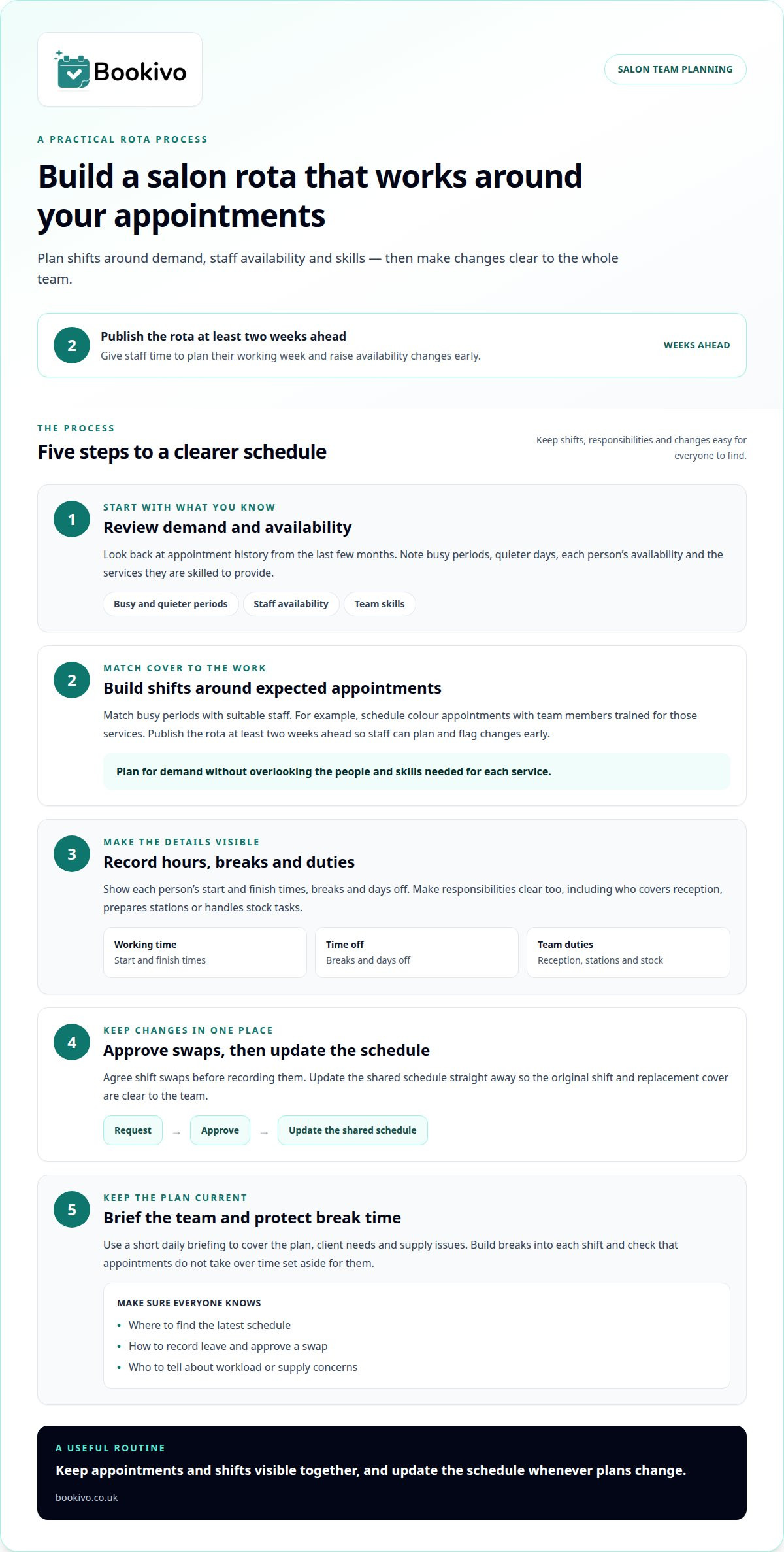
Start with appointment history from the last few months. Mark busy periods, quieter days, staff availability and each person’s skills. Build shifts around demand, matching colour appointments with team members trained for those services. Publish the rota at least two weeks ahead, so staff can plan their working week and raise availability changes early.
Include each person’s start and finish times, breaks, days off and duties. A clear rota also shows who covers reception, prepares stations or handles stock tasks. Approve shift swaps before recording them, then update the shared schedule straight away so the original and replacement shifts are clear.
Match responsibilities to each person’s capacity. An assistant, for example, might prepare stations, clean between clients and restock supplies while a stylist focuses on booked treatments. Assign tasks such as receiving deliveries and recording stock use to specific team members where appropriate. Clear ownership helps prevent work being missed or duplicated.
Use a short daily briefing to cover the plan, client needs and supply issues. Set aside time to train staff on the booking calendar and rota process, then practise common changes such as recording leave or approving a swap. Everyone should know where to find the latest schedule and how to update it. As a team grows, keeping appointments and shifts visible together can make coordination easier.
Build breaks into each shift and make sure appointments don’t quietly consume the time reserved for them. A morning check-in gives staff a chance to flag workload concerns before the day gets busy. After demanding periods, thank the team and discuss what could run more effectively next time. A clear salon booking and team calendar setup can help keep rota changes visible alongside appointments.
3. Preventing double bookings with real-time availability
A real-time calendar gives staff one current view of appointments and available slots. When a client books online, that time should no longer be available to someone else. Keep phone, in-person and online bookings in the same calendar, and enter any manually agreed appointment straight away. This reduces the risk of two people offering or accepting the same slot.
Make the online booking journey easy to use on a mobile device. List each service with its duration and price so clients can choose the right appointment. Show accurate start times and avoid offering a slot that conflicts with the selected service’s length. If a colour service takes longer than a trim, reflect that difference in the calendar before clients book.
Use the calendar to spot gaps as well as overlaps. A waitlist can help you contact clients when a cancellation opens a suitable time. If a morning appointment becomes available, for example, offer it to someone waiting for that service or duration. Clear confirmation messages and appointment reminders help everyone keep track of the booking.
Plan for seasonal demand before the holiday rush. Review previous appointment patterns and staff availability ahead of busy periods such as Christmas and New Year. Open suitable slots early, keep service lengths realistic and allow time for breaks. If demand rises, adjust staff cover rather than squeezing extra treatments into a day without checking capacity.
After any change, update the shared calendar immediately and tell the client and relevant staff about the revised time. Check the schedule at opening and again after cancellations or shift changes. This routine helps the team manage changes consistently, avoid scattered messages and keep the calendar aligned with confirmed appointments.
4. Salon management software and automated communication
A shared system for appointments and client information can make daily coordination clearer. Before changing your process, map the steps from booking to checkout. Identify repeated tasks, such as confirming appointments or searching for a client’s previous preferences. A shared view can also make handovers easier when different team members manage each stage.
Automated reminders can take care of routine appointment messages. Set their timing and wording to suit your booking process, and include the appointment date, time and relevant arrival information. An advance reminder gives clients a chance to spot a diary clash and contact the salon. Staff can then focus on clients in the salon instead of sending each reminder manually.
Use appointment information to plan communication around busy periods. If the diary shows a fully booked Saturday, prepare the team for the workload and review the day’s priorities. When a cancellation creates an opening, contact clients waiting for a suitable slot. Filling the time may support revenue, while a clear confirmation helps prevent confusion about the new booking.
Keep promotional marketing separate from essential service messages. A reminder relates to an existing appointment, while a marketing message promotes a future service or offer. Review message content and timing so clients receive useful information rather than repeated notifications. Use booking patterns to adjust opening times, staff cover and communication plans to match observed demand.
If you are considering how to manage a busy salon schedule, start by streamlining one recurring communication task. Set a consistent process for confirming bookings, recording changes and responding to cancellations. A shared view helps staff work from the same information instead of relying on scattered notes or individual inboxes.
Bookivo
Bookivo is a simple, modern UK online booking and business management platform. Salons can explore whether it is a suitable option for their business by reviewing the available information and comparing it with their own booking and management requirements. This can help when considering alternatives to manual booking coordination.
Make your next scheduling change manageable
A practical approach to how to manage a busy salon schedule starts by identifying one recurring pressure point. Perhaps booking changes take too long to communicate, or appointments are hard to coordinate with staff availability. Set a clear goal for improving that process, then give your team time to adapt before changing another part of the routine.
Bookivo offers Beauty & Salon Booking Software, Aesthetics Clinic Booking Software and an Online Appointment Booking System for salons and aesthetics businesses. Explore the available options to see which may suit your business and its booking needs.
Take the next step at a pace that works for your team. A more organised schedule can begin with one thoughtful change.
Frequently Asked Questions
Can my staff swap shifts?
Staff can swap shifts when the salon has a clear approval process. The person requesting a change can suggest a colleague, then the manager checks that they are available and suitably skilled. Confirm the swap with both team members and update the rota before it takes effect. Record any change in duties too, such as a receptionist covering a stylist’s shift.
How do I create a staff schedule for a small salon?
Start by listing the salon’s opening hours and the cover needed at different times of day. Match staff availability and skills to expected appointments, then assign duties such as reception cover or station preparation. Share a draft rota with the team and resolve availability clashes before publishing it. Review the plan after busy days and adjust it to reflect recurring demand.
How far in advance should a staff schedule be published?
Where possible, publish the rota at least two weeks in advance. Staff can then plan around their shifts and raise availability issues before the week begins. If appointments or leave change the plan, issue an updated version promptly and make clear which rota is current. For seasonal changes, share a provisional schedule earlier so the team can plan ahead.
What must a staff schedule include?
A useful rota shows each team member’s working days, start and finish times, breaks and any agreed time off. Add assigned duties, such as opening the salon, preparing stations or handling deliveries, so responsibilities are clear. Note who covers a task when the usual person is absent. Keep the latest version accessible to the team, especially after approved shift changes.
How much time should salons allow for each service and cleanup?
Allow enough time for each version of a service, not just its core treatment steps. A first appointment may need more consultation time than a returning client’s routine visit, while complex colour work may need extra preparation and finishing time. Where useful, list these as separate booking options. Include station reset and cleaning time before the next client arrives.
How can salons reduce no-shows and late cancellations?
Send appointment reminders with the date, time and a clear way to contact the salon if plans change. Explain cancellation and deposit terms before clients book, using consistent wording in confirmations. If a late cancellation opens a slot, contact clients waiting for that service or time. These steps help the team respond promptly, though they cannot prevent every missed appointment.