Which salon software should solo operators in the UK shortlist?
Compare salon software for solo operators in the UK: assess bookings, payments, marketplace visibility, client management and point of sale to build a shortl...

The obvious choice isn’t always the right fit. The best salon software for solo operators in the UK depends on how you want clients to find, book and pay for appointments. Start by comparing booking-focused systems, then weigh marketplace visibility and point-of-sale tools against your actual needs.
It’s easy to focus on online booking alone, but a manageable diary, clear payment records and useful client information all affect how smoothly you run your business day to day.
This guide compares the main options for bookings, payments, marketplace visibility, client management and point of sale. You’ll see which features suit a solo professional, what to prioritise and how to narrow your shortlist without paying for tools you won’t use.
Key Takeaways
- Prioritise an easy-to-manage booking diary and clear payment visibility when assessing systems for a solo business.
- Weigh the value of marketplace exposure against tools that help you manage client information and appointments.
- Separate integrated payment processing from point-of-sale hardware, then decide which functions your business actually needs.
- Use a consistent feature checklist to compare platforms, and consider Bookivo if you want online booking with a branded booking website.
Essential booking and payment features for solo operators
For a solo beauty business, shortlist software that brings bookings and payments into a clear, manageable workflow. Start with online availability, then compare how each option handles client records, reminders and payment records.
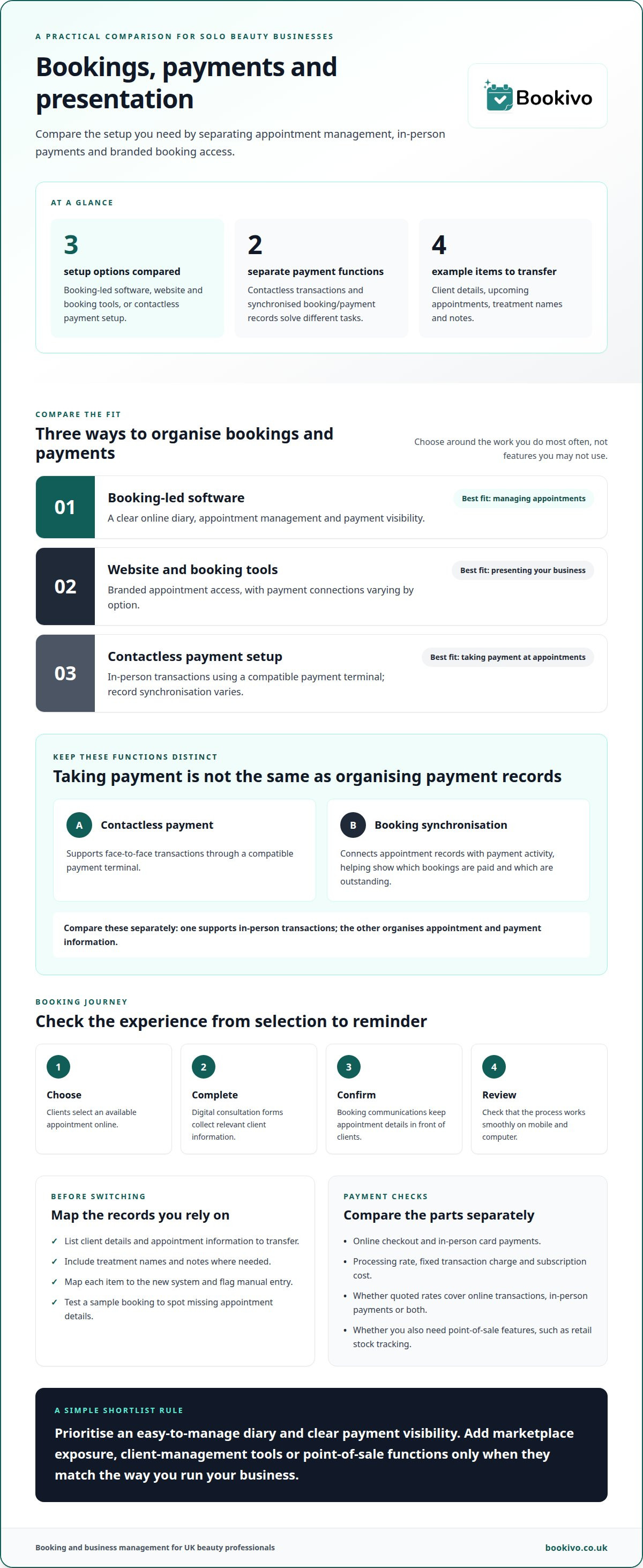
Contactless payments and booking synchronisation
Contactless payment lets clients pay in person using a compatible payment terminal. Booking synchronisation connects appointment records with payment activity, helping you see which bookings are paid and which are outstanding. These are separate functions: contactless supports face-to-face transactions, while synchronisation organises appointment and payment information. Compare them separately rather than assuming one includes the other.
Consultation forms and booking reminders
Online booking lets clients choose an available appointment without arranging it by phone. Digital consultation forms collect relevant client information before the appointment, while automated reminders keep booking details in front of clients. Look for a clear process from choosing a treatment to completing a form and receiving a reminder. Check that it works smoothly on mobile as well as on a computer.
A solo beauty-business website with booking tools gives clients one place to understand your services and book an appointment. Compare a standalone booking page with a branded website: the first focuses on appointment selection, while the second presents your business identity alongside booking access. A clear treatment menu also helps clients choose the right appointment.
Before moving from another booking system, list the information you need to transfer, such as client details, upcoming appointments, treatment names and notes. Map each item to the new system and identify anything that needs manual entry. Test a sample booking before relying on the new diary, so you can spot missing appointment details early.
| Option | Booking | Payments | Best fit |
|---|---|---|---|
| Booking-led software | Online diary | Payment visibility | Appointment management |
| Website and booking tools | Branded appointment access | May connect payments | Business presentation |
| Contactless payment setup | Synchronised records vary | In-person transactions | Taking payment at appointments |
Choose software that covers your busiest booking and payment tasks without adding tools you won’t use.
Marketplace visibility versus client-management tools
A marketplace can help new clients discover a salon, while client-management tools support relationships after booking. Compare where new enquiries come from with the records and communications you need to manage returning clients.
Marketplace visibility places your services alongside other beauty businesses, giving prospective clients a way to find and book you. Client-management software focuses on your own client records, appointment history and follow-up. Some marketplaces charge commission on bookings, so include that cost in your comparison. Consider whether attracting new clients or managing ongoing relationships is your priority.
Automated client communications and admin
Automated communications can send appointment reminders and booking updates, saving you from writing each message manually. If handling enquiries while treating clients is a challenge, using an automated telephone assistant such as oscarpicksup.com can ensure you never miss incoming calls. This differs from marketplace marketing tools, which focus on attracting prospective clients rather than supporting existing bookings. Map a confirmation and reminder to the client’s booking journey, then check whether the system also helps with routine salon management.
Client data export and GDPR compliance
Before switching systems, find out how client details and appointment records can be exported. Start by listing the fields you use, such as contact details, service history and future bookings, then check how each record transfers. UK salons are responsible for handling client data in line with GDPR requirements. Software can support this work, but it does not make a business compliant by itself.
Client profiles and service histories
A client profile brings useful details together, while a service history shows previous appointments and treatments. For example, a returning client’s record can show what they booked last time without searching separate diary entries. This differs from marketplace visibility: profiles support continuity with existing clients, while listings help new clients discover a business. Salon management tools may combine client records with appointment administration.
If a branded booking experience matters alongside client management, view a branded booking website preview as one way to picture that approach.
Integrated payments and point-of-sale features
Payment tools can cover online checkout, in-person card payments and sales records, but these are separate functions. If you need UK payment-provider or accounting integrations, check that the software names the services you use. Assess card payments, invoicing and VAT records as distinct capabilities.
Checkout and payment processing
Checkout is where a client pays; payment processing moves the transaction through a provider. A mobile card terminal supports in-person payments, while online checkout takes payment during booking. Neither automatically provides a full point-of-sale system. Compare each option with your appointment workflow, then consider whether you also need to track retail stock, such as shampoo.
Online payment processing fees
Compare the processing rate, any fixed transaction charge and any separate subscription cost. Check whether the quoted rate applies to online transactions, in-person card payments or both, and include fixed charges in your calculation.
Payment provider and accounting integrations
An integration links booking software with a payment provider or accounting tool, reducing the need to transfer transaction details manually. Check which UK services are supported and whether the connection covers payment records, refunds or reconciliation. Assess scheduling separately: a shared calendar organises appointments, while an accounting integration moves financial information between systems.
Invoicing and VAT records
Card acceptance, invoice creation and VAT records are different features. Check what the software provides and whether you can export records for your accounting process. A client paying by card after an appointment may need a payment record, while a business selling retail products may also need itemised sales information. Don’t assume a payment terminal creates invoices or maintains VAT records.
Comparing salon software platforms
Choosing salon software for solo operators in the UK starts with your daily workflow. Shortlist a booking system that combines online booking, calendar management and client records, then assess its ease of use and support by trying practical tasks.
Online booking, calendars and client records
For a solo operator, these features connect a client’s booking journey with your diary and records. Look for a platform where a test booking appears in the calendar and links to the correct client profile. Then check whether you can find that record easily before a follow-up appointment. Focus on how smoothly the steps work together, not how many features appear on a list.
Ease of use and customer support
Ease of use comes down to practical tasks: can you add a treatment, adjust availability and find a client without searching through unrelated menus? Try these tasks on mobile as well as on a computer. Compare support channels and setup help, and check whether the instructions answer specific questions. Clear guidance can make a transition easier to manage.
If you already use a system, compare the transition as carefully as the booking features. List the records you rely on, such as client profiles and future appointments, then map each to the new system. Test a sample booking before changing your live diary. This shows whether the calendar entry and client record stay connected through the switch.
Use the same practical checks for each platform:
- Create a test salon booking and find it in the calendar.
- Open the client record from that appointment.
- Locate the relevant setup or support guidance.
- Review how existing records can be transferred.
A shortlist of salon software for solo operators in the UK should favour platforms that handle your tasks clearly and fit your daily workflow. If a system handles bookings but keeps records separate, weigh the extra step against its other strengths.
Bookivo: Solo Beauty Business Booking Software
Bookivo is a modern online booking and business management platform for UK businesses. Independent beauty professionals can explore whether it suits their business and booking needs.
Explore how the platform could look for your business with a free branded preview.
Choose a setup that fits your next stage
The right salon software for solo operators in the UK should fit how you run your business now and allow you to refine your setup as your needs change. Let your priorities guide your decision rather than choosing a platform simply because it has more tools. A focused booking system can be a sensible starting point when you want a clearer way to manage appointments.
Bookivo is a UK online booking and business management platform. Consider whether a dedicated booking platform suits the experience you want clients to have and the way you prefer to organise your work.
Take the next step at your own pace. A considered choice can give you a more organised foundation for the business you’re building.
Frequently Asked Questions
Which salon software should you shortlist?
Shortlist a platform that suits your main source of appointments and the way you work. A mobile therapist, for example, may prioritise a booking calendar that’s easy to manage between visits, while a home-based nail technician may value a branded booking page. Test the workflow you’ll use most often rather than letting a long feature list make the decision for you.
What salon software is best for solo beauty operators in the UK?
The best fit depends on the experience you want clients to have and the tasks you need to manage. Bookivo is one option for solo beauty professionals, with a branded booking website that can display your logo, brand colours and service list. You can explore the setup through its free branded preview or try the platform with a 7-day free trial, with no credit card required.
Which salon booking platforms charge commission or payment processing fees?
Some marketplace-style booking services charge commission on bookings, while payment providers may charge separate processing fees. Compare these as different costs, not interchangeable terms. Bookivo charges no marketplace commission on bookings, but standard card-processing fees apply to card payments via Stripe. This distinction helps you compare booking platform costs with payment-processing fees.
Which salon software supports deposits, cancellations and no-show fees?
Some booking platforms support online deposits, but collecting a deposit is not the same as automatically charging cancellation or no-show fees. Bookivo supports deposits and full payments online. Before relying on a system for cancellation charges, check whether its workflow supports the policy you need, and make your terms clear to clients during booking.
How can a solo salon operator switch booking software and migrate client data?
Start by identifying which records your current system allows you to export, then organise the available client details, appointment history, service lists and notes. Bookivo provides a completely free data transfer service for information your existing provider allows you to export. After the transfer, review sample client records and future appointments in the new system before relying on it as your live diary.